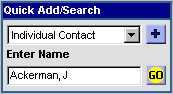
Use the Quick Add/Search dialog box to reduce the amount of time and the number of steps required to add or search for records.
When using the Quick Add function, non-critical prompts are suppressed and a database record search is deferred until the first attempt to save the new record occurs. The user is only alerted if an exact or potential record match is found while saving the new record.
When using the Quick Search function, records can be located and opened directly by selecting the record type and entering a specific name, policy number, or account number.
Select the type of record that you want to add from the drop-down list in the Quick Add/Search dialog box.
Click the Add button to open a blank record in add mode.
Add information to the blank record and then click the Save & Close or Save & New button.
Select the type of record that you want to open from the drop-down list.
Enter a name, policy number, or account number and then click GO.
Enter last names first, and separate first names by a comma.
Enter the first letter, or the first few letters, of a last name to broaden the search.
When an Individual Contact or Business Contact name is not found, the user is prompted to add a new record.