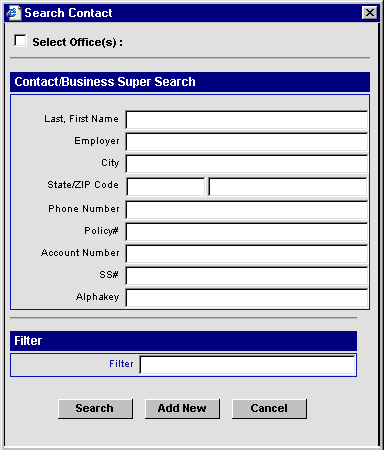
Select the Super Search option to add a new Contact or Business record, or to search for existing records by name, employer, address information, etc. The Super Search option expands the search capabilities by including Phone, Policy, and Account Number fields.
Enter a name or other information that you want to search for in the Contact/Business Super Search fields.
Enter partial or complete information in one or more of the search fields. Using fewer letters and numbers in a field broadens the database search, while more letters and numbers narrows the search. For example, searching for the number 5 in the social security number field would locate all records that contained a social security number that begins with 5. Adding more numbers, such as 5733, would locate all records with a social security number of 573-30-0000, or above.
When multiple fields are used, the logical operator AND is used to combine the search criteria.
Leave all of the fields blank to find all records of the type(s) selected under Include.
Select the type of records to Include in the search.
Selecting record types to Include is optional. To search all record types in the database, do not check any boxes.
When at least one record type is selected, the record types that are not selected are excluded from the search. For example, if you enter the name of a city to search for, and select Contact as the only record type to Include, only the Contact records in the database will be searched for the name of the city.
Click the Search or Add New button.
When the Add New button is pressed, a Select Record Type dialog box opens for the user to choose the type of record to add.
When the type of record is selected, the search dialog box closes automatically and a blank record of the type selected opens.
The check boxes under Include have no affect when adding a record.
The Search button starts the database search for the information and record criteria entered.
When a single record that matches the search criteria is found, the record will open.
When multiple records that match the search criteria are found, the search results are displayed in a summary spreadsheet.
When no records are found that match the search criteria, the user is prompted to add a new record.